
Start with the free options
Every vendor page competing for this search has a commercial reason to hurry past this part. So it goes first.
Clipy: also free and MIT-licensed, with history and snippets. People have run it for years. Its release cadence has slowed, which matters mostly when a new macOS version lands.
Maccy: free and MIT-licensed, actively maintained, about 1.6 MB. Searchable history capped at 999 items, 200 by default. Head-to-head numbers are in Klipto vs Maccy.
macOS itself: macOS 26 Tahoe put clipboard history in Spotlight. Press ⌘Space, then ⌘4, after you turn the Clipboard switch on in System Settings → Spotlight. Items expire in 8 hours by default and 7 days at most, paste comes out as plain text, and nothing can be pinned. On macOS 14 or 15 there is no built-in history at all. Detail in macOS built-in clipboard history.
If all you want is the last 50 things you copied and a way to paste one of them, the free options cover it, Klipto's free tier included. No paid app here makes that specific job meaningfully better.
Paying starts to make sense when you need what a history list does not do. Changing text on its way out. Pasting several items in order. Finding words inside a screenshot. Having a person to email when it breaks.
Where the extra money goes: nothing under $15 does transforms on paste, ordered multi-paste, or OCR search inside images. Those three are the whole gap between the cheap tier and the top of the one-time band. Form filling is the case that convinced me to build this part. Five copied values, one shortcut pressed five times, and the cursor moves itself between the fields.
Every Mac clipboard manager, by price and pricing model
| App | Pricing model | Price (USD unless noted) | Free tier / trial |
|---|---|---|---|
| Klipto | One-time | $19.99 once. No subscription and no annual updates fee | Permanent free tier (5 most recent items, with paste). 14-day full Pro trial, no card, no account. 30-day money-back. Licence covers all your Macs, no device count |
| Paste | Subscription, with a lifetime tier | $2.49/mo on the site; $29.99/yr. App Store: $3.99/mo, $29.99/yr, Family $59.99/yr, Lifetime $89.99, Legacy $9.99 | 7-day trial on every plan; free use capped at roughly 100 items |
| Pastebot 3 | Paid-updates perpetual, or subscription | $39 once including one year of updates, then $19 per further year, optional. Pastebot 2 direct owners upgrade for $12.99. App Store: $2.99/mo or $24.99/yr | 14-day trial, 30-day refund policy |
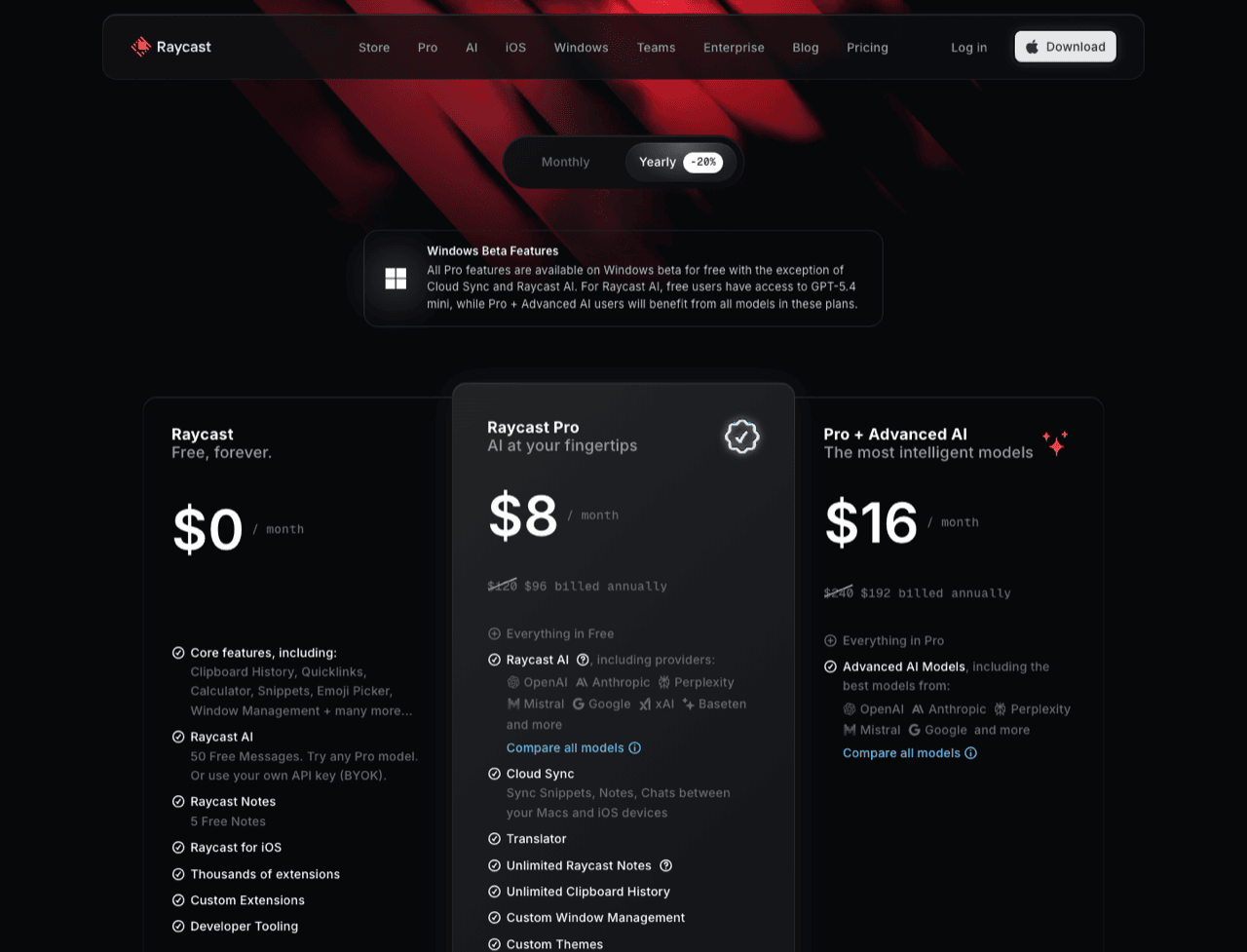
| Raycast | Subscription only | Pro $10/mo monthly, $8/mo billed annually. Advanced AI +$8/mo. Teams Pro $15/user/mo | Free plan is permanent, but clipboard history is capped at 3 months |
| Alfred Powerpack | One-time, paid major upgrades | £34 single user (v5); £59 Mega Supporter, which covers later major versions. Roughly $45 and $78, conversion approximate | Alfred is free; clipboard history needs the Powerpack |
| Clipy | Free, open source (MIT) | $0 | Fully functional at $0 |
| PasteNow | One-time | $7.99 Pro upgrade (App Store in-app purchase, listed with no billing interval). Direct licence activates up to 5 devices | 14-day free trial |
| CopyClip 2 | One-time | $7.99 on the Mac App Store. The original CopyClip is free, with search behind the paid version | 7-day trial via the vendor site |
| CleanClip | Freemium: subscription or lifetime | App Store in-app purchases: $1.99/mo, $14.99/yr, $29.99 lifetime. Its own promo pages and third-party listings show $12.99 and $19.99 one-time instead. The vendor's channels disagree, so treat the App Store figure as the reliable one | Free tier limited to 25 uses per day; 14-day trial |
| Unclutter | One-time | $19.99, site and Mac App Store. Also included in Setapp at $9.99/mo | Free demo |
| PastePal | One-time | $14.99 Pro in-app purchase, universal across Mac, iPhone and iPad | Free tier |
| SaneClip | One-time | $14.99 once ($49.99 for the SaneApps bundle) | 14-day full trial, no card |
| QuietClip | Freemium, one-time upgrade | $8.99 once | Free tier: 25 items, text only, 3 pins |
| The indie tier | One-time | ClipV $3, NanoClip Pro $5, Maus $12.99; Clipory, Coppy, ClipBoardy and Cliply all sell for a single payment | Varies |
| macOS built-in | Free | $0, Spotlight clipboard history, macOS 26 Tahoe only | Ships switched off; items expire after 8 hours by default, 7 days maximum |
Two rows need repeating. CleanClip's pricing is genuinely inconsistent across its App Store listing, its own promo pages and aggregator sites, so any single number quoted elsewhere came from one of the three. Pastebot's App Store subscription was still waiting on approval, so confirm it exists before you plan around it.
Three years of the same app
Raycast Pro billed annually runs about $288, the highest total here, and it buys a launcher and AI features alongside the history. Paste's yearly plan comes to about $90, which lands a rounding error away from its own $89.99 lifetime tier. Alfred's Mega Supporter licence is about $78. Pastebot kept current is $77, or $39 if you skip both renewals and stay on the version you bought. Klipto is $19.99, once. Clipy is $0 for as long as you use it.
Setapp's own comparison content puts the crossover between renting and owning at roughly three months. An argument against subscriptions, written by a subscription company.
The subscription and paid-update apps
Raycast Pro is the one option with no way to buy it outright: $10 a month, $8 billed annually. The free plan never expires, but it caps clipboard history at three months. If you already pay for Raycast Pro, its clipboard history is good, and buying a second app for the same job is money for nothing.
Paste is the best-looking clipboard manager on the Mac, and the reason people complain about subscriptions in this category at all. $29.99 a year, $2.49 to $3.99 a month depending on channel, $59.99 a year for Family. The $89.99 lifetime purchase sits in the in-app list where most buyers never see it. It syncs across Mac, iPhone and iPad, with real hosting behind that. It applies no text transforms on paste, which independent reviewers list among its main frustrations.
Pastebot 3 shipped on 24 July 2026 with the most interesting terms in the category. $39 once with a year of updates, then $19 a year to keep updating. You own whatever version you paid for either way, and Tapbots states that plainly. The Mac App Store build is a subscription instead, $2.99 a month or $24.99 a year. Its filters run shell scripts, which nothing else here matches for range. It needs macOS 26 Tahoe.
Hosted sync deserves a subscription. Paste's cross-device clipboard and Raycast's AI run on servers someone pays for monthly. A local database that never leaves your Mac is harder to bill for, and the size of the buy-once tier suggests most developers here agree.
The one-time tier, $3 to $39
CopyClip 2 ($7.99), PasteNow ($7.99), QuietClip ($8.99), PastePal ($14.99) and SaneClip ($14.99) sell one promise for a single payment: history, pinning, search. Indies go down to $3. They are cheap because the scope is deliberately narrow. QuietClip's free tier holds 25 items, text only. CopyClip's free original keeps search behind the paid upgrade. PastePal covers iPhone and iPad in the same purchase, and PasteNow's direct licence activates five devices.
Alfred is a launcher first, with clipboard history inside the Powerpack: £34 single user, £59 Mega Supporter, roughly $45 and $78 at an approximate conversion. Alfred has charged for major versions before, which is what the Mega Supporter tier settles. Buy it for the launcher and the workflows.
Unclutter is $19.99 on its site and the App Store, and also inside Setapp. It is a drop-down panel holding notes, files and clipboard history together: a shallower clipboard, plus a scratchpad and a file shelf you may or may not want.
Klipto: $19.99, once
$19.99 one time. No subscription, no annual updates fee, no account. A 14-day full Pro trial starts on first launch with no card. There is a 30-day money-back guarantee. The free tier never expires: the 5 most recent items in the popup, with paste. It keeps recording your full history locally meanwhile, so buying later reveals everything already collected. One licence covers all your Macs with no device count, and activation is verified offline, so the app keeps working even if we stop existing.
No subscription is table stakes on this list. A dozen apps above sell for one payment, several of them under $10, so the model earns Klipto nothing on its own. The price has to come from what the app does.
Transforms applied on paste: about 20 of them run in the preview panel and land in the target app on ⌘V. Anti-LLM cleanup strips em dashes, smart quotes and invisible characters. Then case styles, plain text, JSON pretty and minify, colour conversion across HEX, RGB, HSL, SwiftUI, UIColor, CSS and Tailwind, URL, Base64 and JWT decode, and masking for cards, emails and phone numbers. Offline, system-wide, no website round trip.
22 content types, detected automatically: plain and rich text, code, JSON, HTML, CSS, passwords, numbers, payment cards, phone numbers, encoded strings, images, documents, spreadsheets, links, emails, colours, video, audio, files, folders and Figma content. Klipto shows only the actions that fit what you copied, so the transform you want is already in front of you when the preview opens.
The Stack: collect several items, then paste them back one at a time in order, with a counter for how many are left. Collect drags the whole set straight into Figma.
Unlimited local history with OCR search: no item ceiling, and search reads text recognised inside copied screenshots, so an invoice screenshot is findable by its number. A few other apps do OCR. None of them do it in a free tier.
The rest is hold-to-paste (⌥⌘V) and snippets and folders. The build is native: about 5 MB to download, 11 MB installed, one universal binary, macOS 14 Sonoma and later, no Electron.
Klipto is local-first in the plain sense: no account, no cloud, and the clipboard never leaves your Mac. The app touches the network to check for updates and nothing else. Password-manager copies can be excluded in Settings → General.
Do one-time apps keep getting updates?
It depends on the vendor, so read the terms before you pay. For Klipto, updates are included in the $19.99 with no annual fee, and they arrive through Sparkle, the standard update framework for Mac apps sold outside the App Store. The licence itself has no expiry and no device limit.
Elsewhere it varies. Pastebot charges $19 for each further year of updates while letting you keep your version. Alfred has charged for major versions. A subscription updates for exactly as long as you keep paying.
Where Klipto is the wrong choice
You need Mac-to-iPhone sync. Klipto has none, deliberately. If you copy on the Mac and paste on the phone every day, buy Paste, PastePal or PasteNow.
You want a launcher too. Alfred and Raycast fold clipboard history into a bigger tool, and running two apps for one job is worse.
You want shell scripts on your clipboard. Pastebot's filters have no ceiling. Klipto's transform set is fixed.
You run macOS 13 or earlier. Klipto needs macOS 14.