
Turning it on, and what you get
Switch it on: System Settings → Spotlight, then Clipboard. Spotlight may also show an "Enable in Spotlight" prompt the first time you look for the clipboard.
Open it: ⌘Space, then ⌘4, or click the Clipboard button inside Spotlight. Arrow keys move through the list, Return pastes what you landed on, typing filters the view. That is the whole interaction, and it is fast.
Choose the window: 8 hours by default. Since macOS 26.1 you can pick 30 minutes, 8 hours or 7 days in the same Spotlight panel, which also carries a Clear Clipboard History button. MacRumors and 9to5Mac both covered it when 26.1 shipped. Seven days is the ceiling.
What it stores: text, links, images and copied files, each with a preview. Apps can mark a clip as concealed, which is how password managers keep out of the list. Apple documents no fixed item limit, so the constraint is time rather than count. MacMost found that very long text is dropped at roughly 16,384 characters, and that items arriving through Universal Clipboard from another device never appear.
Restarting the Mac changes nothing. A copy made before a reboot is still listed afterwards, as long as its window has not run out. Only the clock removes items.
Every clipboard manager screenshot looks roughly the same, so the thing worth watching is how few keystrokes it takes to get from a copy to a finished paste.
What the video cannot show you is the part I care about most: the database underneath keeps everything, so a copy from March is still there in July. Spotlight's list is a rolling window, and that difference only shows up weeks later.
Where the built-in clipboard history stops
It forgets on a timer. 8 hours by default, 7 days at the outside. An address you copied last Tuesday is gone, and no setting brings it back.
Nothing can be pinned. No favourites, no snippets, no folders. Boilerplate you paste every day has to be re-copied every day.
Paste is plain text only. Formatting is stripped on the way out, always. It is the only transform on offer.
One item at a time. There is no queue and no ordered multi-paste. Filling six fields in a form means six trips through Spotlight.
Search is list filtering. Typing narrows the visible items. Text inside a screenshot stays invisible, and by several accounts filenames are not matched either.
Passwords from ordinary apps are recorded. The concealed-clip flag only helps when the source app sets it. Copy a password out of a plain note and it sits there unredacted. Apple's own support page warns that sensitive information may appear.
No iPhone sync. Universal Clipboard is a separate feature, and its items are excluded from this history.
macOS 26 only. Tahoe runs on Apple Silicon plus four Intel models: the 16-inch MacBook Pro 2019, the four-port 13-inch MacBook Pro 2020, the iMac 2020 and the Mac Pro 2019. Every 2017 and 2018 Intel Mac sits on Sequoia or older with no built-in history at all. Some IT departments switch it off by policy, giving the same empty panel on a new machine.
Side by side: macOS built-in vs Klipto
| macOS 26 Spotlight clipboard | Klipto | |
|---|---|---|
| How to open | ⌘Space, then ⌘4 | hold ⌥⌘V, release to paste |
| Retention | 30 min / 8 h / 7 days max | unlimited, never expires |
| macOS required | 26 Tahoe only | macOS 14+ |
| What it stores | text, links, images, files | 22 content types, including colours, code, JSON and cards |
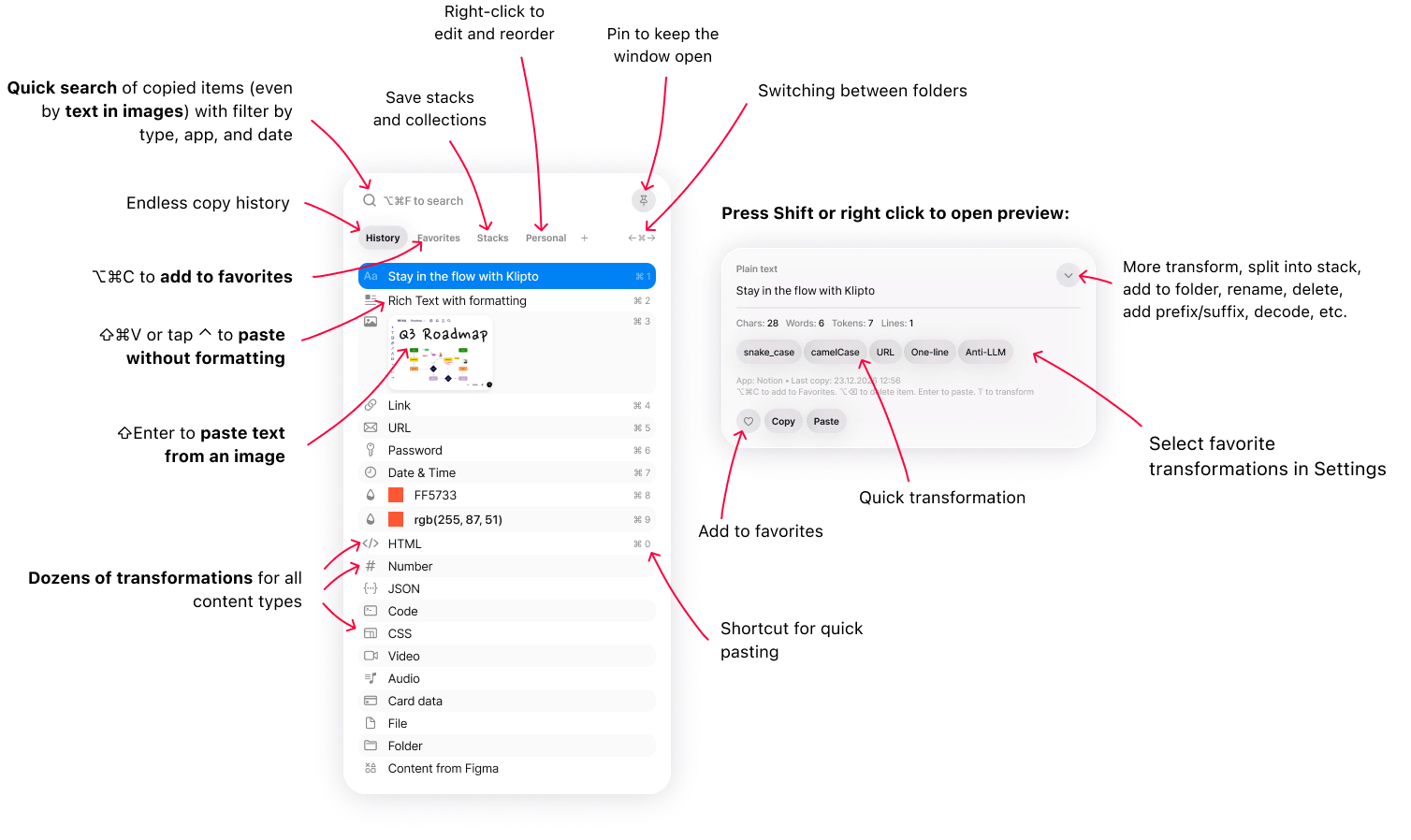
| Search | filter the list | full text plus OCR inside images |
| Pin or save | no | snippets and folders |
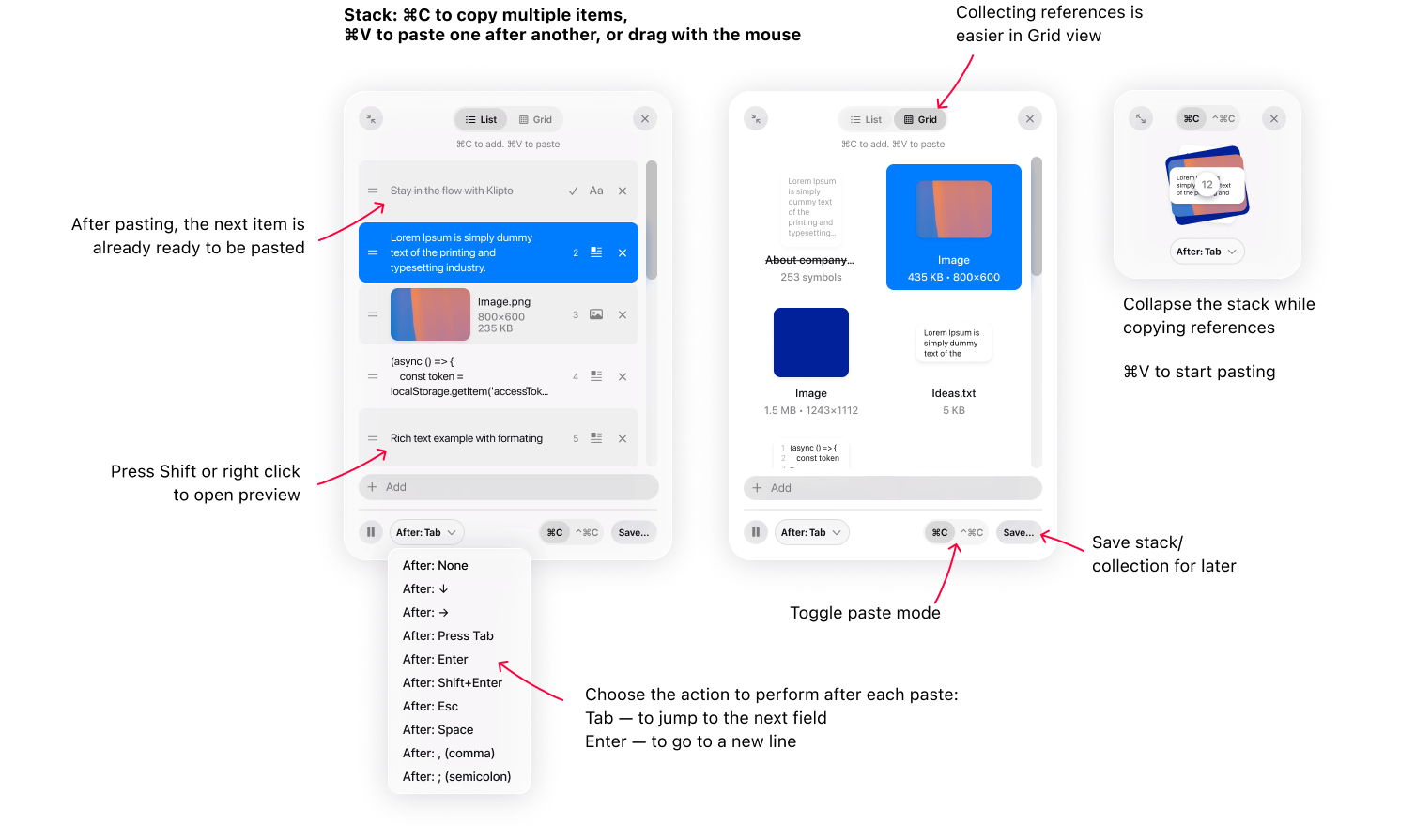
| Paste several in order | no | the Stack, with an after-paste keystroke |
| Transform on paste | plain text only | 20+ transforms |
| Formatting | always stripped | keep it or strip it |
| Where data lives | on-device | on-device, local-first, never uploaded |
| iPhone sync | no | no, by design |
| Price | free with macOS | permanent free tier, $19.99 one-time for Pro |
Two honest notes on that table. Klipto does not sync to your phone either, and will not while a local-first clipboard is the point. Apple also wins on effort: zero installs, one toggle, nothing to buy.
So install nothing if you copy short text, want the previous copy back occasionally, live in Spotlight already, and never think about formatting or last month's links. System Settings → Spotlight → Clipboard, done.
Five cases that still need a clipboard manager
You paste several things in order. Forms, CRMs, spreadsheets, code reviews. Klipto's Stack collects items as you copy them and pastes them in order, with an optional Tab or Return sent after each one so the cursor moves to the next field by itself. Spotlight has nothing of the sort.
You need permanence. Reference snippets, addresses, a link from last month. Klipto keeps an unlimited clipboard history that never expires unless you set your own retention rules, plus snippets and folders for what you paste constantly.
You copy screenshots and want to find them by their contents. Klipto runs text recognition on copied images on your Mac, so you can search the text inside your screenshots. Type the error message you remember, not the date you took it.
You want the paste already cleaned up. Klipto recognises 22 content types and offers the transforms that fit what you copied: case changes, JSON pretty-print or minify, Base64 and JWT decoding, colour conversion between HEX, RGB, HSL and SwiftUI, a masked card or email, and Anti-LLM cleanup that strips em dashes, curly quotes and invisible characters out of generated text. All of it runs at paste time, offline, in whatever app you are in. Plain text is one option among many: paste as plain text when that is what you want.
You are on macOS 14 or 15. Or your Mac cannot run Tahoe. Then there is nothing to compare, because you have no built-in history. Klipto runs on macOS 14 and later, on Apple Silicon and Intel, in about a 5 MB download.
Running both
The two do not conflict. Klipto keeps its own local database and its own shortcut (hold ⌥⌘V to paste), and Spotlight's clipboard carries on independently. My advice is one adjustment: drop Spotlight retention to 30 minutes or switch it off, so the same passwords are not sitting in two separate plaintext stores.
Privacy: what each one keeps
Both write your copies to disk on your Mac. Both record a password copied out of an app that does not conceal its clips. Neither uploads anything. Klipto has no account and no cloud sync, touches the network only for updates, and its licence is an offline signed file with no device limit.
The advice is identical for both. Keep secrets in a password manager, which marks its copies concealed so neither history stores them. Klipto also has a setting that excludes password-manager copies (Settings → General; switch it on, it is not the default).