
First, check what you already have
Tahoe keeps clipboard history in Spotlight: ⌘Space, then ⌘4, or the Clipboard button in the Spotlight row. Arrows move, Return pastes, typing filters. A Clipboard switch sits in System Settings → Spotlight, and sources disagree about whether it starts on. I could not verify that, so check yours. It holds text, links, images and copied files, skips clips a password manager marks concealed, and survives a reboot, seen on 26.5, build 25F71.
Retention is the ceiling. Default 8 hours: PasteboardHistoryTimeout reads 28800 seconds. Since macOS 26.1 the panel offers 30 minutes, 8 hours or 7 days, next to a Clear Clipboard History button (MacRumors). Seven days is the maximum, and the 30-day figure on several sites is not a real setting.
Four other limits matter. Paste comes out plain text, always. Nothing pins, so no snippets, no folders. Text over roughly 16,384 characters is never saved (MacMost), and Universal Clipboard items are excluded. It needs macOS 26, and every 2017 and 2018 Intel Mac stops at Sequoia.
Better than Klipto: free, nothing to install or update, no third-party app reading your clipboard, and Apple already put it on the machine. Full detail in macOS built-in clipboard history.
A third-party app earns its place for last month's copies, queues of values into forms, permanent boilerplate, rich text, screenshot search, or macOS 14 and 15. Otherwise turn Spotlight's clipboard on.
How I chose
Seven criteria, in the order they touch a working day.
Paste flow: keys between wanting a clip and having it in the field, from documented default shortcuts. Ordered multi-paste: whether you can queue clips and drop them in sequence. Transform on paste: whether the app changes the clip before it lands. Case, formatting, JSON, colour format, decoding.
History depth, retention and search, including search inside images. Content types: rich text, images, files, colours, code, and how precisely the app knows which is which. Then sync and platforms, then price, footprint and build.
Two phrases stayed out of the criteria on purpose. "Local-first" and "one-time purchase" separate nothing now: a dozen Mac clipboard apps shipped in two years with both on the front page, Klipto included.
Every app below has a trial or a free tier, so the honest way to choose is a week of real work with two of them, then deleting one.
Vendor pages give you the numbers. They cannot tell you whether a popup lands where your hands already are, and neither can mine.
Paste flow: the part nobody counts
Every page competing for best clipboard manager for Mac counts storage. Clips, days, sync. None count what you do forty times a day.
So count the keys on default settings. Spotlight: ⌘Space, ⌘4, arrows, Return, two chords before the list appears. Menu-bar apps: one hotkey, arrows, Return. Raycast: one hotkey then Enter if you gave Clipboard History a hotkey, a launcher round trip if you did not. CopyClip 2 and Pastebot are tightest for a slot you know: ⌘1-9 in CopyClip 2, ⇧⌘V then a number in Pastebot's Quick Paste, no window to dismiss.
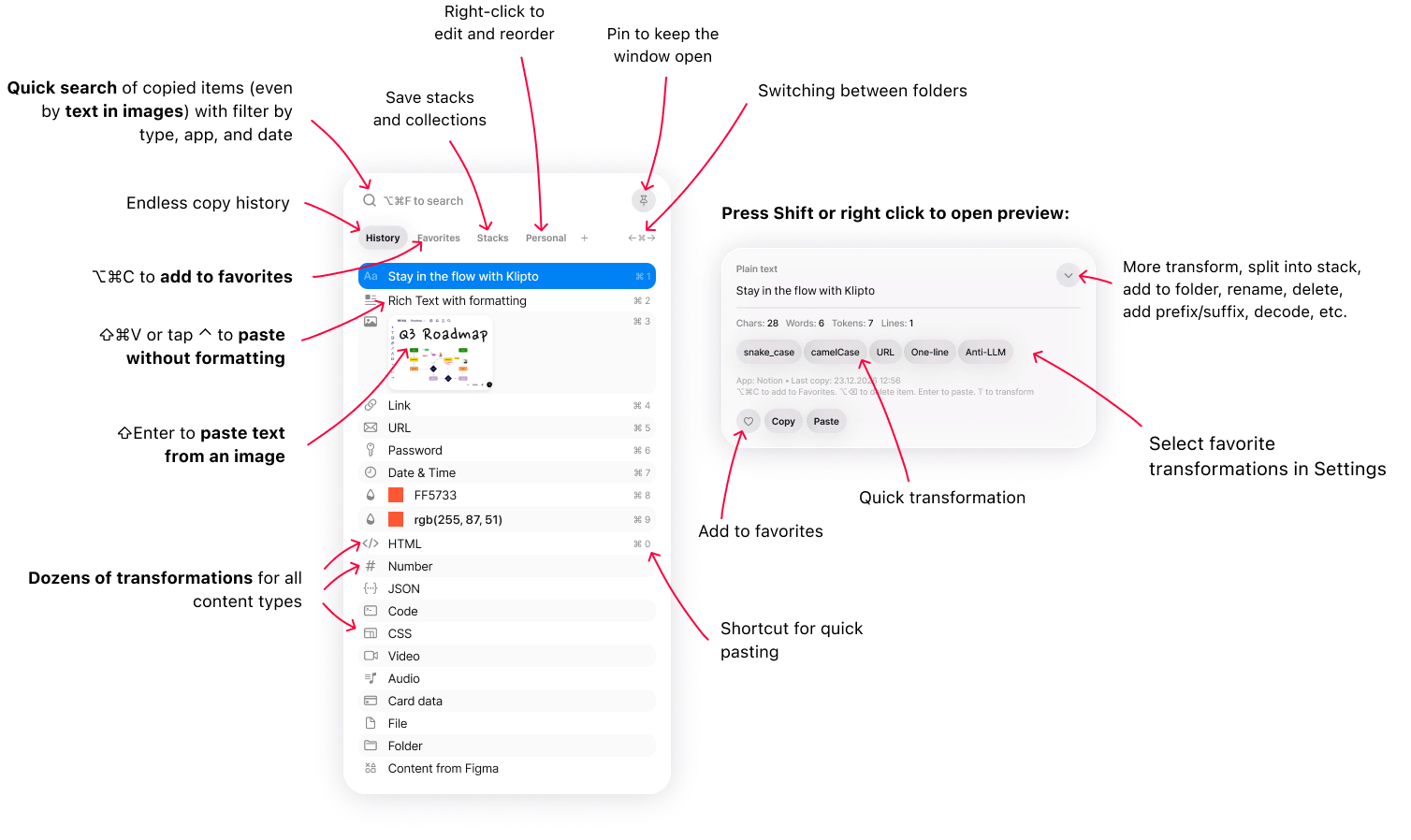
Klipto's popup lives inside the hold. Hold ⌥⌘V and the list appears while the modifiers are down. Release, and the highlighted item pastes. The newest clip is one gesture, no confirming keypress; item three is two arrow presses inside the same hold (hold-to-paste).
Five values into five fields, in any app without a queue, means five trips through the history plus five Tab presses. Near twenty keys. Klipto, Pastebot and Paste have queues. In Klipto it is five presses of one shortcut. The Stack returns items in collection order and fires a key you choose after each paste: Tab, Enter, Shift+Enter, an arrow, Esc, a space, , or ; . Pastebot's Stacks order clips, with no auto-advance key documented.
That is arithmetic from documented shortcuts, not a stopwatch.
The best Mac clipboard managers, side by side
| App | Price / model | Free tier | History depth | OCR search in images | Ordered multi-paste | Transforms on paste | Sync / iOS | macOS |
|---|---|---|---|---|---|---|---|---|
| Klipto | $19.99 once | Permanent, 5 recent items | Unlimited, local | Yes | Yes, + after-paste key | ~20, by content type | No / no | 14+ |
| Paste | $2.49-$3.99/mo · $29.99/yr · $89.99 lifetime | None; 7-day trial | Unlimited | Not in published feature list | Yes | Plain-text toggle | Yes / yes, + iOS keyboard | 14+ |
| Pastebot 3 | $39 once + $19/yr optional · or $24.99/yr | None; 14-day trial | 1,500 clippings | No | Yes, Stacks | Filters you build, incl. shell scripts | Yes, Mac to Mac / no | 26 only |
| Raycast | Free; Pro $8-$10/mo | Permanent, 3-month retention | 3 months free; unlimited on Pro, opt-in | Yes | No | Format only | No / no | not verified |
| Alfred | £34 · £59 with free upgrades | Alfred free; clipboard needs Powerpack | not verified | not verified | Merge, not a queue | Workflows, not on paste | No / no | not verified |
| PasteNow | $7.99 once | Yes; 14-day trial | not verified | No | not verified | No | Yes / yes | not verified |
| CopyClip 2 | $7.99 once | CopyClip free, no search | 9,999 clips | No | No | Plain-text paste | No / no | 11.5+ |
| Clipy | Free, MIT | Fully functional | 30 default, configurable | No | No | No | No / no | 13+ |
| Maccy | Free, MIT | Fully functional | 200 default, 999 max | No | No | No | No / no | 14+ |
| macOS Spotlight | Free with macOS | n/a | 8 h default, 7 days max | No | No | Plain text only | No / no | 26 only |
Prices and versions came off vendor pages and App Store listings in July 2026. Cells marked "not verified" are ones no primary source confirmed.
The apps, reviewed
Paste, for a clipboard that crosses devices
Since 2015, version 6.6.x, 4.2 stars from around 1,300 Mac App Store ratings, 154.6 MB. Subscription only: $2.49 a month or $29.99 a year direct, $3.99 monthly or $29.99 yearly on the App Store, $59.99 a year for Family, Setapp from $14.99 a month. An $89.99 lifetime in-app purchase hides where most buyers never find it. No permanent free tier, a 7-day trial.
Better than Klipto: private iCloud sync, real iPhone and iPad apps, clipboard history inside the iOS keyboard, shareable pinboards, Siri Shortcuts actions. Copy on a Mac and paste on a phone: buy Paste. More in Klipto vs Paste.
Pastebot 3, the closest feature set to Klipto's
Version 3.0 shipped 24 July 2026, a ground-up rewrite (MacStories, 9to5Mac). It requires macOS 26 Tahoe, so Sonoma and Sequoia are out. Tapbots sells it at $39 direct with a year of updates, then $19 per further year, optional, and you keep the version you paid for. The App Store version is $2.99 a month or $24.99 a year. Direct version 2 owners upgrade for $12.99, App Store version 2 owners get nothing. 1,500 clippings.
Better than Klipto: filters that run shell scripts, with no ceiling, which Klipto's fixed transform set cannot match. Smart Pastebins file clippings by regex. iCloud sync between Macs. Nine Shortcuts actions, a command-line tool and a local MCP server, so an AI agent reads and writes your clippings. Scripted pastes on Tahoe: Pastebot is the better buy. More in Klipto vs Pastebot.
Raycast, if the launcher is already how you work
Clipboard History is a built-in command, storing text, images, files, links, emails and colours locally, encrypted on disk. ⌘P filters by type, with plain-text paste, editing, pinning and Save as Snippet. Free retention tops out at 3 months; Pro adds 6 months, 1 year and Unlimited at $10 a month, or $8 billed annually. The manual notes longer retention is not automatic, so an untouched setting still expires at three months. Clipboard history is excluded from Raycast's sync on every plan, deliberately.
Better than Klipto: the whole launcher, at $0 for the clipboard part. Encryption at rest, password-manager and transient clips ignored by default. Its Text Recognition reads text inside copied images, so OCR search is parity here, not a Klipto exclusive. More in Klipto vs Raycast.
Alfred, for automation depth
Alfred is free, and clipboard history lives in the Powerpack. That is £34 for a single user, £59 for the Mega Supporter licence with free upgrades, roughly $45 and $78 at an approximate conversion. Alfred has historically charged for major versions, which the Mega Supporter tier settles. Its clipboard merge appends clips into one blob, useful and not an ordered queue.
Better than Klipto: the deepest automation on macOS, with workflows, scripting, chained hotkeys and a mature community library. £34 buys far more than clipboard history. Own the Powerpack: use the clipboard you paid for.
PasteNow and PastePal, the cheap route to sync
PasteNow is free with a $7.99 one-time Pro in-app purchase. It syncs across Mac and iOS over iCloud, with smart lists, an iOS keyboard, and a direct licence for up to 5 devices. PastePal is $14.99 once, universal across Mac, iPhone and iPad. Both run 14-day trials and both undercut Klipto.
Better than Klipto: PasteNow and PastePal each sync across devices at a one-time price, which Klipto cannot offer at any price. Sync on an $8 budget: this is the row to read.
CleanClip, sync in the one-time band
CleanClip's pricing disagrees with itself. App Store in-app purchases are $1.99 a month, $14.99 a year and $29.99 lifetime, while its promotional pages and third-party listings show $12.99 and $19.99 one-time. Treat the App Store figure as reliable. Free tier: 25 uses a day after a 14-day trial. The $19.99 tier covers 3 devices, plus $4.99 each.
Better than Klipto: it syncs your clipboard between devices, which Klipto does not do at all. Sync at a one-time price: shortlist it next to PasteNow and PastePal.
CopyClip 2, cheap, simple, fast on the keys
$7.99 once on the Mac App Store, version 3.993 as of 16 June 2026, macOS 11.5 or later. 9,999 clips, search, pinning with ⇧⌘P, ⌘1-9 paste shortcuts, source-app metadata, per-app exclusion, plain-text paste, 10 themes. The original CopyClip is free with search behind the paid version, and the $14.99 price across search results is stale.
Better than Klipto: $12 cheaper, and macOS 11.5 runs it, four releases behind Klipto's macOS 14 floor. On paste flow it wins outright for a known slot: ⌘1-9 pastes with no window. On an older Mac, for the last 20 things you copied, this is enough app.
Clipy, the free open-source veteran
MIT, 8,797 stars, and alive. Version 1.2.2 landed 4 June 2026 and 1.3.0 on 20 June 2026 after an eight-year gap, with daily commits through July. It stores strings, RTF, RTFD, PDF, file names, URLs, TIFF and PNG, and snippet folders are why people keep it. History defaults to 30 items, and search does not exist: you scroll a menu.
Better than Klipto: free, MIT, and it runs on macOS 13 Ventura, which Klipto does not. Free snippet folders in the menu bar, rich text preserved where Spotlight flattens it. On Ventura, Clipy is one of very few live options.
Klipto, for multi-clip work and pasting things changed
$19.99 once, no subscription, no annual updates fee, updates included. Unlimited local history, a History window filtered by date, app and content type, and OCR search that finds a screenshot by a number printed inside it. The Stack pastes collected clips in order with an after-paste key, Split Copy (⌃⌥⌘C) turns a block of text into one queue item per line, and Collect drags a batch into Figma. About 5 MB, macOS 14 and later, universal binary, no Electron, local-first, with the network touched only for updates.
22 content types, detected automatically. Plain and rich text, code, JSON, HTML, CSS, passwords, numbers, payment cards, phone numbers, encoded strings like JWT and Base64, images, documents, spreadsheets, links, emails, colours, video, audio, files, folders and Figma content. Detection is why the right transform is already waiting when the preview opens. Around 20 run the moment you press ⌘V, offline, in whatever app has focus. Anti-LLM cleanup for em dashes, curly quotes and invisible characters. Colour conversion across HEX, RGB, HSL, SwiftUI, UIColor, CSS and Tailwind. JSON pretty and minify, eleven case styles, JWT and Base64 decode, masking, and a live character, word, line and token count.
The free tier is the popup with your 5 most recent items and paste, permanent, no card, no account. It keeps recording underneath, so buying later reveals everything collected while you decided. A 14-day Pro trial runs first, with a 30-day money-back guarantee, and one licence covers all your Macs with no device count.
What Klipto will not do: no sync, no iPhone or iPad app, no launcher, no workflows, no shell scripts, no open-source licence, nothing below macOS 14.
Which one should you pick?
Mac to phone: Paste, PasteNow at $7.99, PastePal at $14.99, or CleanClip.
Already paying for Raycast Pro or own the Alfred Powerpack: use the clipboard history you have.
Shell-script filters, on macOS 26: Pastebot 3.
macOS 13 Ventura: Clipy.
macOS 26, and you only ever want the previous copy back: Spotlight. Install nothing.
An old Mac and $8: CopyClip 2.
Queues of values into forms, AI drafts cleaned daily, hex codes, JSON and JWTs, screenshots searched by contents: Klipto at $19.99 once.
Download Klipto, macOS 14+, about 5 MB, free tier, 14-day Pro trial with no card. Pricing.